
Tarief-Taskform
| |

Koppeling factuursturen.nl

Via een form-connector kan de koppeling naar factuursturen.nl worden gemaakt. Hierdoor kan je bijvoorbeeld een in de app getekende werkbon automatisch laten factureren via factuursturen.

Instellen koppeling:

Maak bij de instellingen van je account in factuursturen een nieuwe API sleutel.
(Menu instellingen – Verbindingen – API)
Deze sleutel zet je samen met je username van factuursturen om naar een Base64 encoded key,
<username>:<APIkey>
(online zijn diverse conversietools beschikbaar)

Op het dashboard van TaskForm selecteer je het formulier dat je wilt koppelen, klik  op ‘connect’ en vervolgens op ‘ADD CONNECTOR’

Vul de volgende gegevens in:
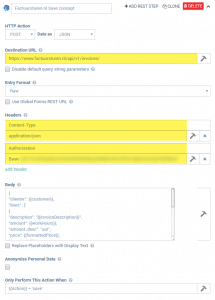
Bij ‘Body’ bouw je het JSON bestand op dat Factuursturen nodig heeft voor het aanmaken van een factuur, zie hiervoor de documentatie van de API ( https://www.factuursturen.nl/docs/api_v1.pdf)

Je kunt daarbij gebruik maken van de velden op het formulier door de dubbele accolades te gebruiken.
Voorbeeld:

"clientnr": {{customer}},
"lines" : [ 
{
"description": "{{invoiceDescription}}",
"amount": {{workHours}},
"amount_desc": "uur",
"price": {{formattedPrice}},
"tax_rate": 21
},
{
"description": "Reiskosten",
"amount": {{km}},
"amount_desc": "km",
"price": 0.60,
"tax_rate": 21
}
],
"action": "save",
"savename": "Appform {{%ENTRYGUID}}"
}

Wanneer alles is ingevoerd sla je de connector op en wordt deze gebruikt bij de eerstvolgende upload van je formulier.
Vergelijkbare berichten

  • | |

    Overzichtsscherm

    Het overzichtsscherm (Board of Icons) is een scherm om verschillende formulieren op een overzichtelijke wijze weer te geven. Zo kan een gebruiker eenvoudig navigeren naar het scherm dat hij op dat moment nodig heeft. Om een ​​overzichtsscherm toe te voegen; Navigeert naar Apps -> Screens Klik op de knop + Add new Geef uw overzichtsscherm…

  • REST

    If you have access to technical personnel (software developers) and are looking to tightly integrate with our platform, then this Connector option is worth a look. The REST Connector will send automatically form entry data in XML or JSON format to a web service address that you specify. This allows you to integrate with us…

  • Google Spreadsheet

    Our platform enables you to quickly and easily connect your data sources to data from a Google Spreadsheet. This enables a one-way synchronisation to occur – where any changes in the Google Spreadsheet are downloaded into your data source on a regular basis. Your data source will be automatically updated in this way until you…

  • FAQ

    Is it possible to connect a form to an Excel spreadsheet on Google Drive, One Drive or Dropbox so that each time a form is filled out on the device, it adds a line to the same spreadsheet? Our Google Spreadsheet connector currently supports this scenario, in that we append rows to the same Google…

  • Een formule gebruiken

    Most advanced Form functions involve the use of a formula. As such it is critical that you understand how to create formulae in order to get the most out of our advanced features. First off you need to know how to address or refer to a field in your Form. This is done by using placeholders wherever you…

  • PDF opmaak tips

    Avoid floating textboxes Word and Excel both allow you to insert textboxes that “float” on top of the page or spreadsheet. While these can be really useful for getting positioning of content just right, we do not officially support textboxes in data templates. Some customers have reported satisfactory PDF results when using textboxes, but your mileage…