
Algemene instellingen connectors

Most of our connectors are different in various ways depending on what systems they connect to and the functionality they provide.

However there are also some common options that most connectors feature.

These are described below.


Add a Run Condition
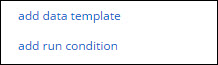
common_con_settings.jpg

Sometimes you may have a Connector that you only want to fire in the event that the Form entry has a given answer value.

For example you may have an Audit Form, which has a risk rating question with options like “Low”, “Medium” and “High”.

If the user answers the risk rating as “High”, then you want an email to be sent to a supervisor for followup and action.

This is where a Run Condition comes in.

Run Conditions are defined by creating a true/false formula.

The Connector will only run if the formula you define in the Run Condition has a true result.

So in the example above, the Run Condition formula would be something like:

{{riskRating}} = ‘High’

When you hover over the Run Condition field, you will see a hammer icon appear.

Clicking the hammer will take you into the Formula Builder, which helps you to put together the formula you desire.

See the Creating a Formula page to learn more about form formulae.
Vergelijkbare berichten

  • | |

    Koppeling factuursturen.nl

    Via een form-connector kan de koppeling naar factuursturen.nl worden gemaakt. Hierdoor kan je bijvoorbeeld een in de app getekende werkbon automatisch laten factureren via factuursturen. Instellen koppeling: Maak bij de instellingen van je account in factuursturen een nieuwe API sleutel. (Menu instellingen – Verbindingen – API) Deze sleutel zet je samen met je username van…

  • FAQ

    Is it possible to connect a form to an Excel spreadsheet on Google Drive, One Drive or Dropbox so that each time a form is filled out on the device, it adds a line to the same spreadsheet? Our Google Spreadsheet connector currently supports this scenario, in that we append rows to the same Google…

  • Google Spreadsheet

    Google Spreadsheets is a popular, free platform used for creating and maintaining spreadsheets. It’s popularity has also resulted in Google Spreadsheets becoming a commonly accepted means of sharing data between systems. One of the easiest ways to automate your process is to connect your form data entries to a Google Spreadsheet. For example, if a…

  • Email

    One of the most common requirements is to be able to email a copy of the Form entry to various people. For example, if a building inspection is performed you may want to email a Certificate of Inspection to the building owner. Or if you are taking a product order from a customer, you might…

  • REST

    If you have access to technical personnel (software developers) and are looking to tightly integrate with our platform, then this Connector option is worth a look. The REST Connector will send automatically form entry data in XML or JSON format to a web service address that you specify. This allows you to integrate with us…